
A notch app for your Windows desktop.
Vayli for Windows is a notch app by Modi Studio that puts music, clipboard history and everyday tools in a small panel at the top of your screen.
What is a notch app on Windows?
A notch app is a software panel that occupies a small area near the top edge of your desktop. It can stay compact while you work and expand when you need a control or a piece of information. You do not need a laptop with a physical camera cutout. The notch is drawn by the application, so the idea also works on a conventional external monitor.
People sometimes search for a “dynamic island for Windows” when they want this kind of compact, changing panel. Vayli offers that style of interaction for Windows tasks. It is an independent desktop utility from Modi Studio, not an Apple or Microsoft product, and it does not add phone hardware features to a PC.
How the Vayli app opens and closes
After installation, the notch waits at the top of the screen. Move your pointer up to it, click it, or use your configured keyboard shortcut to open the panel. You can then choose a tool, check information or perform a small action. Move away when you are finished and the panel tucks back into its resting form.
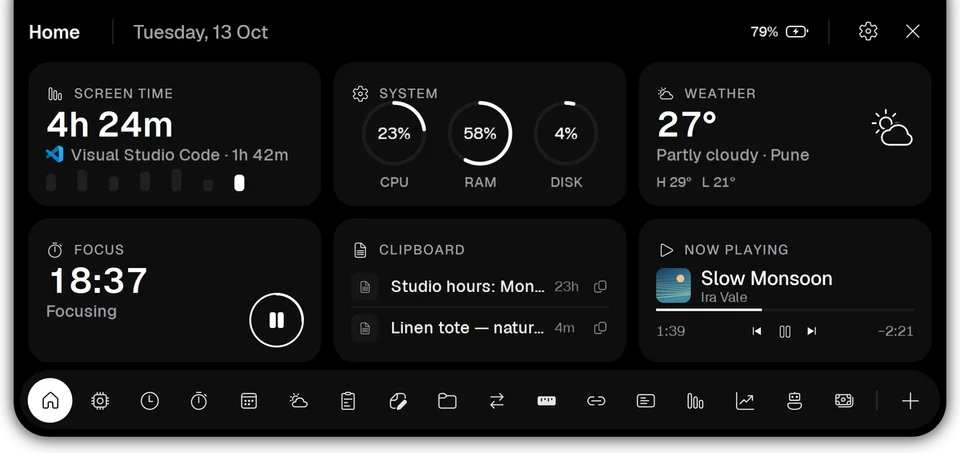
The Home panel combines a view of screen time, system load, weather, a focus timer, recent clipboard items and music playback. It is intended for quick checks between tasks. You can explore the Home panel and individual tools before deciding which ones belong in your own setup.
Small tasks without another full-size window
Imagine writing an email while collecting information from a few documents. Copy the useful text, keep an attachment on the File Shelf, and start a focus timer for the remaining work. These are separate tools, but they share the same place on your screen. You choose the ones you use instead of opening every available module.
Clipboard History gives you a searchable list of copied text, links and images. File Shelf holds files while you move between destinations. Notes keeps quick text and checklists nearby. Music controls work with players that expose playback through Windows media controls; support depends on the player you use.
Live activities and appearance
The resting notch can briefly show an event such as a volume change, an active timer or a song. The panel then returns to its compact state. This lets a short piece of information appear close to your work without keeping the entire tool interface open. The timer tools include focus sessions, a countdown and a stopwatch.
Vayli includes Line, Notch and Island styles, along with appearance options and Edge Light. Choose a theme that suits your desktop and turn modules on or off in Settings. Multi-monitor setups are supported, so you can place the notch on your preferred display. Use the three-day trial to check how it fits your screen arrangement and normal applications.
Privacy, compatibility and trying it
Vayli for Windows runs on 64-bit Windows 10 version 1809 or later and Windows 11. Clipboard history, notes, parked files and screen-time records stay on your PC. Some features need connections: weather, currency rates, calendar links, services you connect and license validation. The privacy policy explains those boundaries and the controls for clearing local data.
Install from the official Microsoft Store download guide and try all tools for three days without creating a Vayli account or providing a card for the trial. A license costs ₹199 one-time + GST for one PC and includes Vayli 1.x updates. Later major versions are paid upgrades. Start with the tools you reach for each day and keep the rest switched off until you need them.
Questions about notch app guide
Do I need a physical notch on my monitor?
No. Vayli for Windows draws its own software panel at the top of the screen and works on a conventional monitor.
Is this an official Dynamic Island app?
No. Vayli is an independent Windows utility by Modi Studio. Dynamic-island style describes the compact, expanding interaction; it does not imply affiliation with Apple.
Can I try it before buying?
Yes. Install from Microsoft Store and try every tool for three days. A license is ₹199 one-time + GST for one PC.