
Clipboard history, close to your work.
Vayli for Windows puts searchable clipboard history in your desktop notch, alongside music, notes, timers and other everyday tools.
Start with the clipboard Windows already includes
Windows has a built-in clipboard history panel. Press Windows+V to open it and enable history if prompted. It is a useful place to start when you want to retrieve something you copied earlier without installing another application. Microsoft documents a history limit of 25 copied entries and a size limit of 4 MB per item; supported formats include text, HTML and bitmap images.
Windows also offers an optional clipboard sync setting for supported text across devices. Unpinned history is cleared on restart, while pinned entries are retained. See Microsoft’s clipboard documentation for its current settings and limitations. These are Windows features, separate from Vayli’s local clipboard tool.
Where Vayli changes the workflow
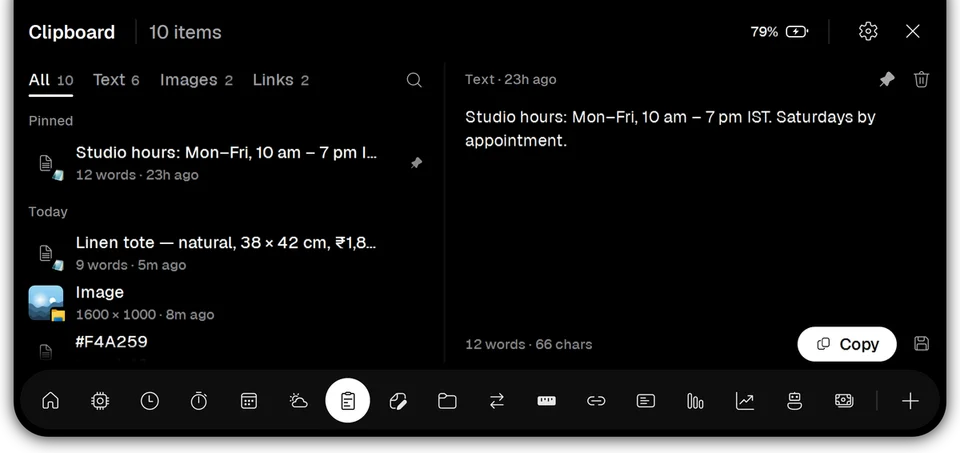
The Vayli app puts copied text, links and screenshots into a searchable list in the notch. You can browse recent items, inspect a selected item and pin material you reuse. Instead of navigating a separate utility window, open the same panel you use for a timer or a quick note. The difference is where the task lives and how you find a previous copy.
For example, when preparing an email you might copy a reference number, a short address and a paragraph from different documents. Search for a remembered word to find the item you need. Pin a frequently reused piece of text so it stays easy to reach. Review the selected content before using it, especially when several copies look similar.
Choose based on your actual copying habits
If you mainly need a few recent copies and prefer built-in controls, start with Windows+V. If you regularly look for text by a remembered word, reuse pinned snippets, or want clipboard access beside other desktop tools, try Vayli’s approach. You do not need to choose based on a claimed productivity score: test the same everyday task in each interface.
During the trial, use ordinary non-sensitive material. Copy a few paragraphs with distinct words, an image and a link. Find an older paragraph, pin something you will reuse, then remove an item you no longer need. This is a more useful comparison than filling a clipboard with sample entries that do not reflect your work.
Keep clipboard privacy in mind
Copied material can include personal details, private documents or temporary codes. Vayli stores its clipboard history locally on your PC; it is not a cloud clipboard sync service. The tool is designed to skip content from password managers, but that is not a substitute for checking what you copy from browsers, documents or other applications.
Use Settings → Privacy to inspect and clear the local data Vayli keeps. Clearing Vayli’s data and managing Windows clipboard history are separate actions because they belong to separate features. Read the Vayli privacy policy for storage details and network activity. You can also turn off modules you do not want to use.
Try the whole workflow, then decide
Clipboard History is one of 17 included tools, rather than a separately priced add-on. You can keep a file ready in File Shelf, jot something down in Notes and return to a copied passage from the same notch. The notch app guide explains how the panel opens and settles back.
Follow the download and installation guide to try Vayli for Windows free for three days. Every tool is available during that trial, without a Vayli account or card. If the workflow suits you, a license is ₹199 one-time + GST for one PC, including all Vayli 1.x updates. Later major versions are paid upgrades. Contact Modi Studio if you need help with activation or have a question about local data.
Questions about clipboard history guide
Does Vayli replace Windows+V?
Vayli provides a separate clipboard-history tool in its own notch panel. Windows+V remains the built-in Windows clipboard interface.
Does Vayli sync my clipboard between PCs?
No. Vayli clipboard history is stored locally on the PC. Windows clipboard sync is a separate Windows feature.
Can I search and pin copied items?
Yes. Vayli Clipboard History supports a searchable list of copied text, links and images, with pins for items you reuse.